Onboarding
Open your Amazon.in seller account properly, with the first listings ready
We prepare the papers, the catalogue and the first listings. You open the account in your own name and Amazon verifies it. The account steps on this page are Amazon's own, quoted from its seller registration guide.
- Ten years selling on Amazon India, from our own accounts
- Your account and your card. Nothing is routed through us
- A fixed quote in writing within one working day
- 3 free seller tools in your browser and a free extension, no sign-up
- GST-registered business, Kalkaji, New Delhi
What we prepare
What we prepare for Amazon.in
Your GST and PAN papers, lined up
We check that the business name, the GST registration and the pickup address agree before you start. Amazon wants the pickup address in the state the GST is registered in, so we look at that first.
A catalogue sheet for the first products
Titles, brand, variants, weights, dimensions and barcodes in one sheet, so each listing is typed from a checked source and not from memory.
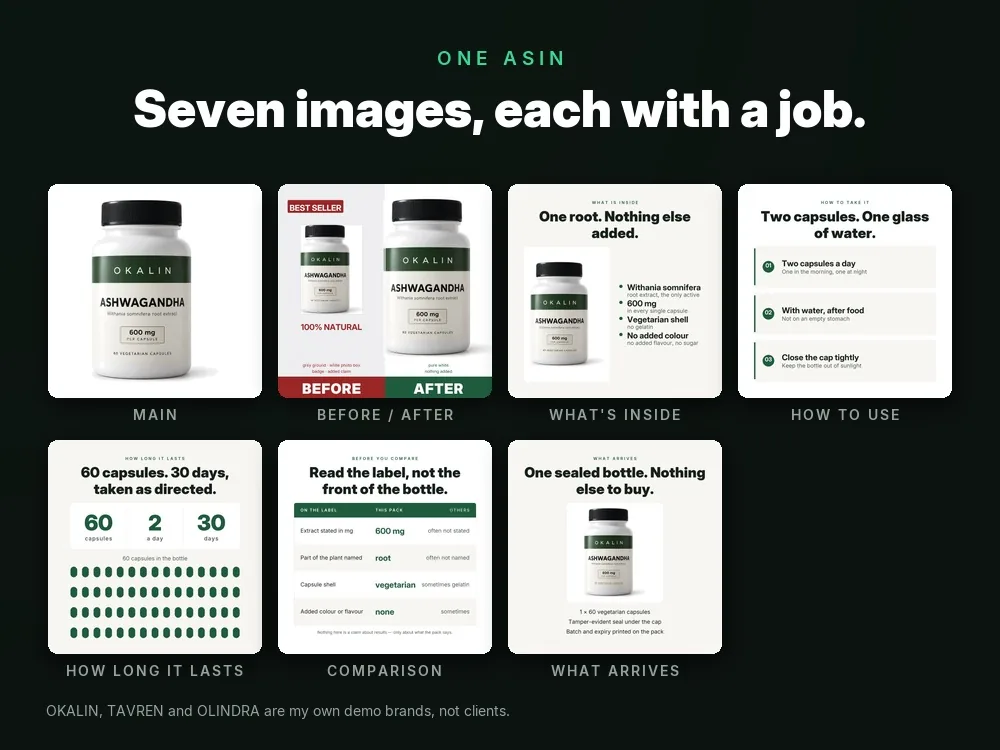
Images to Amazon's image rules
A main image on a clean background and a set built around it, run through our free listing image checker before anything is uploaded.
Listing text from real searches
Titles, bullets, description and backend keywords written from what buyers type, inside Amazon's listing rules. See listing optimisation.
A price that knows the fees
A per-order margin worked out with our free margin sheet on Amazon's published fee schedule, so the price is set knowing what is left.
You provide
- Your GST registration, PAN, bank account details and pickup address.
- A phone number and an email you control, for Amazon's verification codes.
- Product details, brand papers if you own a brand, and the photographs you already have.
Amazon.in decides
- Whether the GST verification passes, and the email that reports the outcome.
- Any category or brand permission, and whether a listing stays live or is suppressed.
- Everything about your seller account once it exists: Amazon's rules apply to it, not ours.
Who can sell
Who can sell on Amazon.in
Amazon publishes a registration guide for sellers. These are the lines from it that decide who can open an account.
GST registration is required: "As per Indian regulations, GST registration is mandatory to sell products on online marketplaces like Amazon." Amazon adds that only GST-exempt products can be sold without a GST number, by giving PAN details.
Source: sell.amazon.in/sell-online/seller-registration-guide, read 6 Oct 2026
The pickup address has to be in the same state that the GST registration is in.
Source: sell.amazon.in/sell-online/seller-registration-guide, read 6 Oct 2026
One store name per seller account. To use more than one store name, each is registered as a separate seller account, and each new account needs a different GST registration.
Source: sell.amazon.in/sell-online/seller-registration-guide, read 6 Oct 2026
An account is started from sell.amazon.in or sellercentral.amazon.in with Start Selling. An existing Amazon customer login can be reused, and Amazon asks for a phone number check with an OTP.
Source: sell.amazon.in/sell-online/seller-registration-guide, read 6 Oct 2026
Documents
Documents Amazon.in asks for
Amazon's public guide names one document and lists the details its sign-up flow asks for. It does not publish a list of identity documents, so we do not print one.
If GST verification fails, Amazon asks for the GSTIN certificate (Reg-06 with Annexure A and Annexure B), as pdf, jpg or doc, under 10 MB.
Source: sell.amazon.in/sell-online/seller-registration-guide, read 6 Oct 2026
Details asked for in the sign-up flow:
- GST number
- Store name
- Pickup address
- Shipping method
- Bank account (the account used for the business)
- Default tax rate
Source: sell.amazon.in/sell-online/seller-registration-guide, read 6 Oct 2026
How it works
Who does what when you open the account
Amazon.in's own steps
Amazon lists the account steps in this order:
- Enter GST number
- Verify GST number
- Enter store name
- Enter pickup address
- Choose shipping method
- Add bank account
- List your products
- Launch your store
Source: sell.amazon.in/sell-online/seller-registration-guide, read 6 Oct 2026
Amazon emails the outcome of the GST verification. At least one product listing has to be completed before the store can be launched.
Source: sell.amazon.in/sell-online/seller-registration-guide, read 6 Oct 2026
You
Gather the papers
GST certificate, PAN and the bank account you use for the business, in one folder you can reach from your phone.
Us
Prepare the catalogue, images and text
The first products are written up and imaged while you gather, so the sign-up is not waiting on listings.
You
Start Selling, in your own name
You enter the GST number, store name, pickup address, shipping method and bank account yourself. The login stays with you; nothing is routed through us.
Amazon decides
GST verification
Amazon checks the GST number and emails the outcome. If the check fails, it asks for the GSTIN certificate.
Us
Check the first listing before you submit
Amazon needs at least one completed listing before the store can launch. We read your listing against the sheet before you press submit.
Fees
Fees on Amazon.in
Amazon publishes its fee page for sellers. We link it and print no figure, because the page changes.
The fee page announces a change to closing fees, effective 7 September 2026. Read the page itself for the current schedule before you price anything.
Source: sell.amazon.in/fees-and-pricing, read 6 Oct 2026
Why choose us
What stays the same on every job
We have done this with our own money
We have opened and run Amazon.in accounts ourselves for ten years. The sign-up screens and the first-listing mistakes are not new to us.
The account is yours from the first screen
Your name, your card, your bank account. We prepare and check; you press the buttons that need your identity.
A written checklist, not a call
You get the folder list and the catalogue sheet in writing, so the work continues even if you are travelling.
Setting up a new Amazon.in account?
Tell us what you sell and whether you already hold a GST registration. The fixed quote comes in writing within one working day.
In depth
Opening an Amazon.in seller account: what the sequence asks of you
Start from the registration order Amazon prints
Amazon publishes a seller registration guide that lists the account steps in a fixed order: enter the GST number, verify it, enter a store name, enter the pickup address, choose a shipping method, add a bank account, list products and launch the store. That order is the spine of this page, and it is Amazon's, not ours. Reading it before you begin tells you which of your papers will be asked for first.
The first requirement is a GST registration. The guide says it is mandatory on online marketplaces, with an exception for GST-exempt products, which can be sold by giving PAN details. The second is a pickup address in the same state as the GST registration. A seller who runs a warehouse in one state and holds a registration in another has a question to settle before anything else, and it is cheaper to settle it on paper than in the middle of the form.
Where preparation earns its keep
Much of the work happens before and after the form, not inside it. Before: we check the name on the GST certificate against the name you will type, we write the first products into a catalogue sheet, and we build the images and text. After: we read the first listing against that sheet. The form itself is short and it is yours, because it carries your identity and your bank account.
One store name belongs to one seller account, so a second brand under a different store name needs a separate account with a different GST registration. If you plan more than one brand, it is worth deciding that now. Our account management page describes what the daily work looks like once the account is open.
After Amazon says yes
A verified account is the start of the work, not the end. The listing text, the images, the price against the fee schedule and the first advertising all come next. Amazon decides which categories or brands need a permission before you can list in them, and it decides whether a listing stays live, so we describe those as open questions rather than promises. We never state how long any Amazon check takes; Amazon emails you the outcome and that is the only reliable source.
When the account is steady, Amazon ads and Brand Store and A+ design are the usual next steps, and Amazon marketing agency shows how the 15-day pilot measures a listing rebuild with four numbers from your own reports.
Questions
Common questions
Do I need GST to sell on Amazon.in?
Amazon's guide says GST registration is mandatory on online marketplaces. The exception it names is GST-exempt products, which can be sold by giving PAN details. Confirm your product's position with your tax adviser.
Can I use my normal Amazon shopping login?
Amazon's guide says an existing customer login can be reused, and that you will be asked to verify your phone number with an OTP. The account is still created in your own name.
Will you open the account for me?
No. You open it in your own name because it carries your identity and your bank account. We prepare the papers, the catalogue and the first listings, and we check them before you submit.
What if the GST verification fails?
Amazon's guide says it then asks for the GSTIN certificate (Reg-06 with Annexure A and Annexure B), as pdf, jpg or doc, under 10 MB. Amazon decides the outcome.
Where are Amazon's fees?
On Amazon's own fee page, linked in the fees section above. We print no figure because the page changes and states that closing fees were being updated.
Related
Other platform onboarding pages
- Flipkart onboardingCatalogue and price sheet
- Meesho onboardingSupplier account and catalogue
- Myntra onboardingFashion and lifestyle sellers
- AJIO onboardingFashion marketplace account
- Nykaa onboardingBeauty and wellness brands
- JioMart onboardingSeller account and catalogue
- GeM onboardingGovernment e-Marketplace seller
- Blinkit onboardingQuick-commerce listing prep
- Zepto onboardingQuick-commerce listing prep
- Swiggy Instamart onboardingQuick-commerce listing prep
- BigBasket onboardingGrocery and daily-needs brands
- Quick-commerce managementRunning several apps together
Ready for a fixed quote?
Send three sentences: what you sell, what is not working, what you want by when. The quote comes in writing within one working day, and it names the deliverable, the price and the date.